

Shredder Machine Selection: How to Pick the Perfect One for Your Needs
2026-05-20
Choosing the right shredder machine can feel overwhelming with so many options on the market. Whether you're handling sensitive documents, industrial waste, or everyday office paper, the perfect shredder blends efficiency, security, and durability. But how do you cut through the noise and find the one that truly fits your workflow? From cut types to capacity, the details matter more than you think. In this guide, we break down what to look for—and why a trusted name like Shengzhong Shredder might just be the game-changer you need.
What Are You Shredding? Pinpoint Your Security Level
Before feeding anything into the machine, ask yourself what exactly you’re destroying. A credit card statement feels different from a cocktail napkin, and the shredding standard should reflect that. The security level you need hinges on the sensitivity of the material—casual junk mail can vanish with a basic cross-cut, but legal documents or proprietary business plans demand particle sizes so tiny that reassembly becomes a puzzle with no solution.
A good rule of thumb: if the content could embarrass you professionally or land someone a stolen identity, step up the level. A P-3 shred might handle routine bank statements, but pre-approved loan forms with personal data are better off reduced to confetti under a P-4. For anything covered by privacy legislation—think patient records or tax returns—a P-5 micro-cut ensures that even a dedicated snoop equipped with patience and tweezers can’t piece your history back together.
Don’t assume a higher number is always the answer. Over-shredding bulky, low-risk materials like newspapers wastes time and clogs delicate blades. Instead, keep two bins in your office: one for everyday paper, and a high-security slot for the sensitive stack. Matching the material to the right level not only extends the life of your shredder but also gives you peace of mind that the truly dangerous stuff is truly gone.
Cut Types Demystified: Strip, Cross, or Micro?
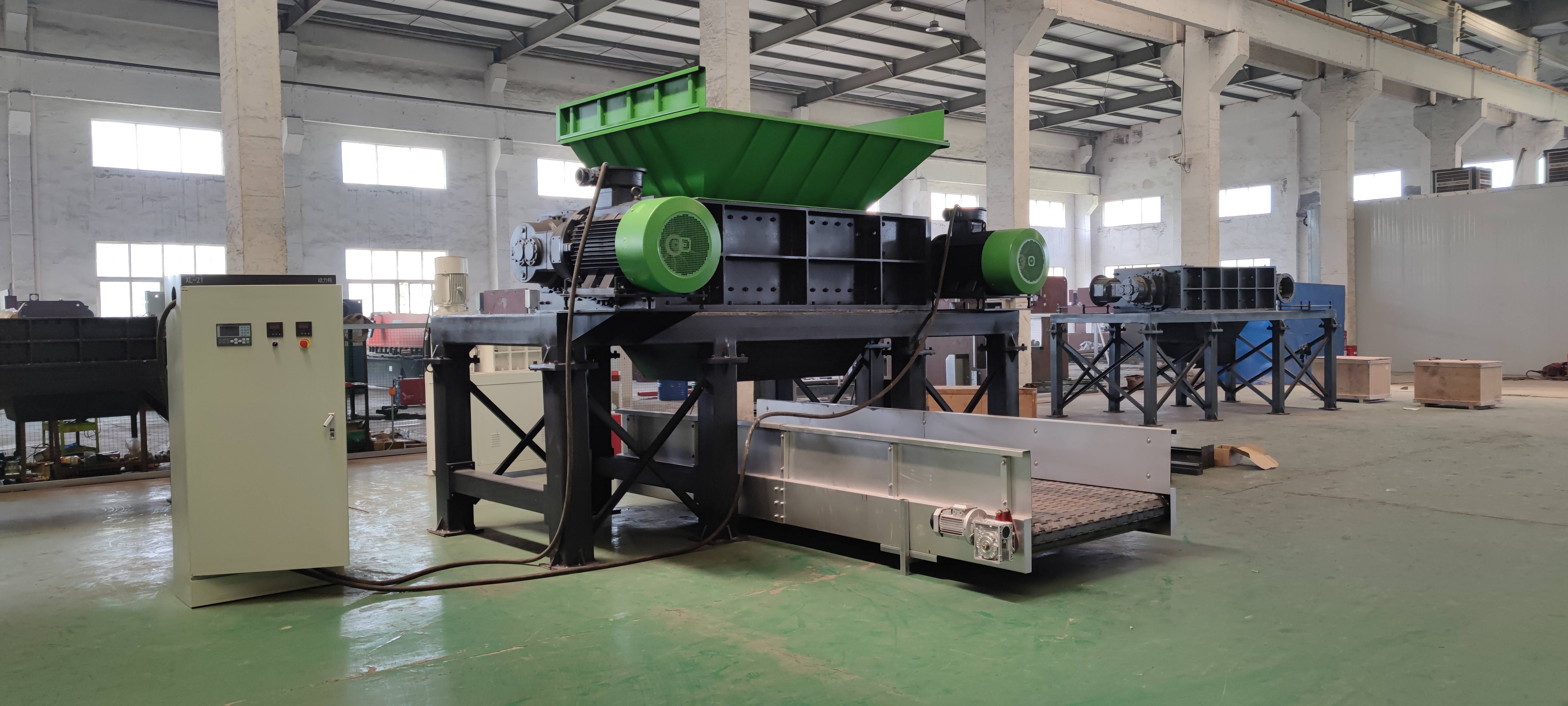
Picking the right cut style can transform your material processing, yet it’s often overlooked until something jams or wears out. Strip cutting shreds paper and similar materials lengthwise, cross cutting chops them into tiny particles, and micro cutting goes even finer for security that borders on powder. Understanding these differences isn’t just for shredder specs—it directly affects throughput, maintenance, and how usable your output becomes.
Strip cut machines produce long ribbons, which are great for high-volume recycling or packing material but offer minimal confidentiality. Cross cut adds a second dimension, turning sheets into confetti-like bits; this balances speed and privacy, making it a go-to for general office use. Micro cut takes things further, grinding material into minuscule fragments that meet strict data protection standards, though the trade-off is slower operation and sharper blade wear.
Pair your choice to the job. If you’re baling cardboard for reuse, strip cutting moves fast and keeps fibers intact. For sensitive documents that still need decent hourly throughput, cross cut hits the sweet spot. Reserve micro cut for financial records, ID cards, or anything legally required to vanish without a trace. A quick glance at your final application saves time, money, and a heap of frustration later on.
How Long Can Your Shredder Run Before Overheating?
Most home shredders can run continuously for anywhere between 2 to 10 minutes before the thermal cutoff kicks in. The actual limit depends heavily on the motor's quality and the machine's duty cycle rating. Budget models often overheat after just a few sheets, whereas mid-range units with better cooling might handle a sizable stack before demanding a break.
If you're tackling a backlog of documents, resist the urge to push through. Letting the shredder cool down for at least 15 minutes between sessions not only prevents nuisance tripping but also preserves the motor and blades. Some office-grade shredders claim a 30-minute continuous runtime, but factors like paper weight, humidity, and even voltage fluctuations can shorten that window significantly.
A quick way to gauge stress is by touching the housing—if it feels uncomfortably warm, it's time to pause. Forcing a hot shredder to keep going can lead to permanent damage, including dulled cutters and melted internal components. If you regularly shred in bulk, consider stepping up to a model with a built-in cooling fan or a higher duty cycle. It’s a small upgrade that saves both time and frustration in the long run.
Noise Levels: When Does It Become Too Loud for the Office?
It starts subtly—a phone ringing a few too many times, the steady clatter of keyboards, or a conversation at the next desk that just won’t fade into the background. For most people, an office noise level between 45 and 50 decibels feels comfortable, comparable to the hum of a quiet suburb. Yet, many modern open-plan spaces routinely spike to 60 or even 70 decibels, where focus starts to fray and stress quietly builds. The line between lively buzz and disruptive clamor isn’t just about volume; it’s about the unpredictability and lack of control over the sounds around us.
Research points to a sharp drop in cognitive performance when speech becomes intelligible, even at moderate volumes. This is the real culprit: overheard conversations force the brain to involuntarily process language, draining mental resources needed for deep work. When sound masking is absent and desks are crammed together, employees often slip into a cycle of hidden irritation and burnout. It’s not the loud printer but the half-heard phone call that chips away at concentration, making the office feel louder than the decibel meter suggests.
So, when exactly does “too loud” hit? Typically, sustained exposure above 65 decibels—roughly the sound of a busy restaurant—starts triggering annoyance and measurable dips in productivity. But the real answer depends on task complexity: creative problem-solving demands lower thresholds, while routine tasks may tolerate more. The smartest offices aren’t silent; they’re designed with varied acoustic zones, giving people agency to choose the backdrop that suits their moment. That choice, more than any specific number, determines whether an office hums or howls.
Smart Features That Save You: Auto-Feed and Jam Prevention
Tired of babysitting your shredder during big cleanouts? The auto-feed mechanism takes the guesswork out of the process. Just load the stack, press start, and let the machine pull in and shred sheets at its own pace—no manual feeding, no paper cuts, just steady, reliable progress. It even senses when the bin is getting full and pauses to remind you, so you’re not ending up with a confetti spill on the floor.
What really sets this apart is the jam prevention system. We’ve all done the “reverse-forward-reverse” dance when a shredder gets clogged, only to end up yanking out crinkled paper with a pair of pliers. This model actively monitors resistance and adjusts the cutting cycle to stop jams before they start. If it detects a thick staple or a stray credit card, it either powers through with a stronger pull or reverses to spit it back out, saving you the hassle and protecting the blades.
Behind the scenes, these features work together to extend the life of your machine. By avoiding unnecessary strain and overheating, the shredder stays cooler and sharper over time. You get a tool that’s not just smarter on the surface, but built to handle whatever you throw at it—without demanding constant attention or a maintenance manual in return.
Maintenance Secrets to Keep Your Shredder Running Longer
Most people don’t give shredders a second thought until they start making strange noises or grinding to a halt. The first trick is regular, gentle cleaning. Built-up paper dust and tiny adhesive residues from envelopes can clog the cutting heads faster than you’d imagine. Every few uses, unplug the machine, take a soft brush (an old paintbrush works perfectly), and carefully sweep away debris from the entry slot and the blades underneath. A can of compressed air can also blow out stubborn particles hiding in the crevices.
Lubrication is another step that’s often skipped. Shredder oil isn’t a gimmick; it reduces friction and keeps the cutting assembly moving smoothly. You don’t need to do it after every session, but a quick oiling every time you empty the bin or after a heavy shredding job extends the motor’s life. Simply drizzle the oil onto a sheet of paper in a zigzag pattern, feed it through, and then run the reverse function for a few seconds to distribute it evenly. Avoid using household oils, as they can gum up the works.
Beyond cleaning and oil, your usage habits matter. Pushing a shredder past its rated capacity—whether it’s sheet count or continuous run time—strains the motor and dulls blades quickly. Give it breaks to cool down during long tasks, remove staples and paper clips when possible (even if the model claims to handle them), and steer clear of shredding materials like cardboard or glossy brochures unless the manual explicitly allows it. These small adjustments prevent the majority of jams and premature wear.
FAQ
Start by thinking about how often you'll use it and what you'll be shredding. A small home office might only need a basic strip-cut model for occasional junk mail, while a busy workplace handling sensitive documents will want a cross-cut or micro-cut machine that can keep up with daily demand.
It's crucial if you're dealing with confidential data. The DIN security scale ranges from P-1 (basic strip-cut, easy to reassemble) to P-7 (tiny particles for top-secret materials). For most businesses, P-4 cross-cut is a solid balance of security and performance, but if you handle legal or financial records, stepping up to P-5 or micro-cut makes sense.
Definitely. If you'll be shredding in bursts, check the continuous run time before the motor needs a break. Some machines can run for 20–30 minutes nonstop, but cheaper ones might only go for 2–3 minutes and then need a long cool-down. Match this to your work style so you don't get stuck waiting.
It's not just about capacity—think about how often you want to empty it. A 20-litre bin might be fine for personal use, but a shared office might require 60 litres or more to avoid constant trips to the recycling bin. Also, a window to see the fill level saves you from guessing when it's full.
They can save you a lot of hassle. Auto-feed lets you stack a pile of documents and walk away, which is great for multitasking. Jam protection sensors stop the machine before it chokes, so you aren't pulling out crumpled paper. If time is money, these features often pay for themselves.
Not all shredders can handle them. If you need to destroy plastic cards or optical discs, look for a dedicated slot or a machine rated for multimedia. Many standard office shredders handle staples and paper clips fine, but always check the specs to avoid damaging the blades.
The cheapest option might tempt you, but it can burn out quickly if you push it. Focus on the warranty and duty cycle. A shredder with a 10-year warranty on the blades and a higher daily shred capacity likely uses better materials. Spending a bit more upfront often means fewer replacements down the line.
Regularly oiling the blades is key—use shredder oil or lubricant sheets every so often, especially after heavy use or if you shred adhesive envelopes. Also, don't overfeed it; the paper limit isn't a suggestion. A little care extends the machine's life dramatically.
Conclusion
Selecting the ultimate shredder starts with understanding what you’ll be destroying. Whether it’s junk mail or classified contracts, the required security level dictates the cut type—from basic strip-cut to cross-cut for everyday office use, or micro-cut when dealing with sensitive data that demands near-total obliteration. Yet, even the finest blades won’t matter if the machine can’t keep up. Overlooking continuous run time leads to abrupt cooldown pauses; a home user might only need a few minutes, but in a busy office, look for shredders that can run twenty to thirty minutes without overheating. The right balance between security and endurance sets the foundation for a frustration-free experience.
Modern shredders also need to blend into the workspace without causing a racket—anything above 70 decibels can disrupt conversations and phone calls, so checking the noise rating is a must. The smartest units nowadays ship with auto-feed trays that let you stack a pile of sheets and walk away, while jam-prevention sensors stop misfeeds instantly, saving both time and shredded fingers. Of course, even a top-tier machine will degrade if neglected: regular oiling of the cutting blades and avoiding overstuffed bins are simple habits that drastically extend its lifespan. Pairing intelligent features with minimal upkeep turns a basic appliance into a long-term office ally.
Contact Us
Contact Person: Leon
Email: [email protected]
Tel/WhatsApp: 8615385558866
Website: https://www.shred-waste.com